Build your platform, module by module.
Pick a starting point, add the modules and providers you want, and leave with its architecture diagram.
Have a blueprint code?
What it is
Your platform, drawn before the first call.
Paynoramic Studio is a free builder for fintech and crypto platforms. You name your platform, pick a starting point, add the modules it needs and the providers each one connects to, and leave with its architecture diagram.
It runs in your browser, with nothing to install and no account to create. The modules are our own library and the providers are the ones those modules connect to, so the diagram you take away is a platform we can build.
How it works
Five steps, from a name to a diagram.
Name
Give your platform a name and a colour. Both go on its diagram, with your logo if you add one. The logo stays in your browser.
Start
Start from one of our platforms, already assembled, or from scratch with only the modules every platform needs. You can change everything after.
Modules
Add the modules you need and take out the ones you do not. Something we do not list? Name it, and it goes on your diagram as a custom module.
Providers
For each module, pick the providers you already work with or prefer, or decide later. What you leave open, we suggest on the call.
Yours
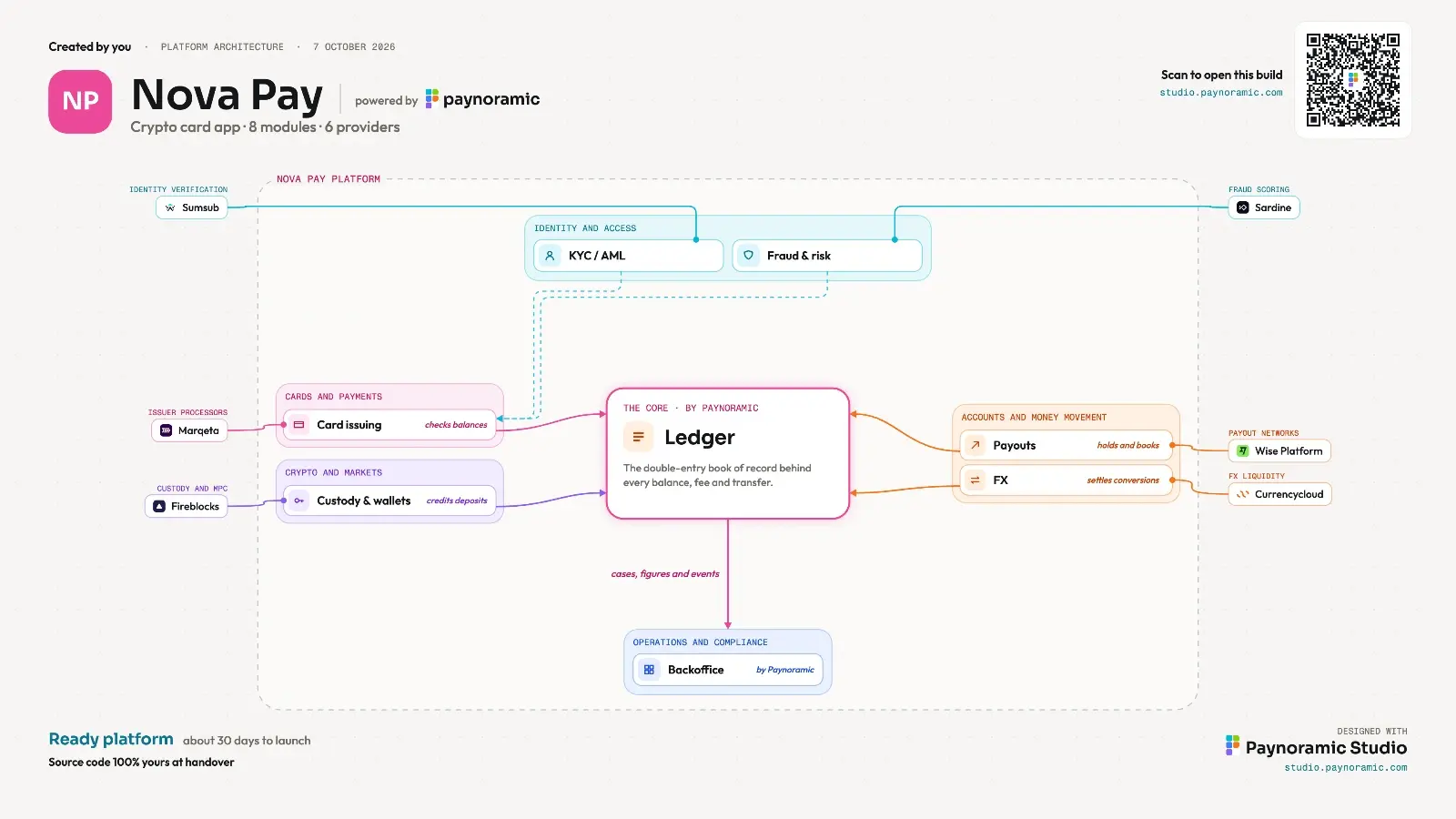
Your diagram: the ledger at the core, your modules around it, each wired to its providers. Put your name on it to download it.
What you leave with
A diagram, a link, and an answer.
The architecture diagram
Your platform on one page, as a PNG and a PDF, with your name on it as its creator and your company if you add it. Made to be shown in your next meeting.
A blueprint link
An address of its own for your build, with an eight-character code and a QR code printed on the diagram. Open it again, or hand it to someone else.
A reply within one business day
Sign your blueprint and our team writes back with what it takes to build it. Or keep the diagram and send it when you are ready.
Questions
Before you start.
Is Paynoramic Studio free?
Yes. Building a platform, saving it and sharing its link cost nothing, and there is no account to create. We ask for a name and a work email only when you sign a blueprint, which is how you get the diagram's files and a reply from our team.
Is my build saved?
Yes, from the moment you pick a starting point. Each build is a blueprint with a link and an eight-character code of its own, so you can open it again on another day or another device. A blueprint nobody signs is deleted 12 months after its last change.
Who can see my blueprint?
Anyone you give its link or code to, and our team. A blueprint holds the name you gave the platform, its modules, its providers and its colour, and no personal details. Only the browser tab that made it can change it: a change made anywhere else is saved as a copy, so nobody alters yours.
Do I have to choose the providers?
No. Choose the ones you already work with, and leave the rest open: the diagram shows our pick for each module, and we go through them with you on the call. If you have a system of your own, or a contract in place, the modules connect to that instead.
What happens when I sign it?
Your name and company go on the diagram as its creator, the PNG and the PDF are yours to download, and our team replies within one business day. Your details are used only to reply about that build, as our privacy policy explains.
What if my platform is not one of yours?
Start from scratch and say what you are building, an exchange platform or a wallet app for example. You get the modules every platform needs, add the others, and name up to five we do not list. It is built from the same module library as our own platforms.
Where to start
Start from a platform we have already assembled.
Pick one in the Studio's second step and it arrives with its modules in place, ready to change. Each has a page of its own.
- Crypto exchange
- Stock exchange
- SoftPOS
- Banking app
- Crypto card app
- Payment gateway
- Remittance app
- Stablecoin checkout
- B2B stablecoin payments
- Crypto on-ramp
- Business account
- Super app
- Family banking app
- Crypto OTC desk
- Gold savings app
Every choice in the Studio comes from the module library and the providers it connects to.